
How to Make Cursive Practice Worksheets: Trace, Copy & PDF
Design cursive alphabet, name, word, and sentence worksheets with trace and copy rows, guided lines, and Letter or A4 export. Free and paid accounts can download PNG or PDF pages with monthly credits.
By Handwriting AI Team · · Updated 2026-09-12 · 8 min read
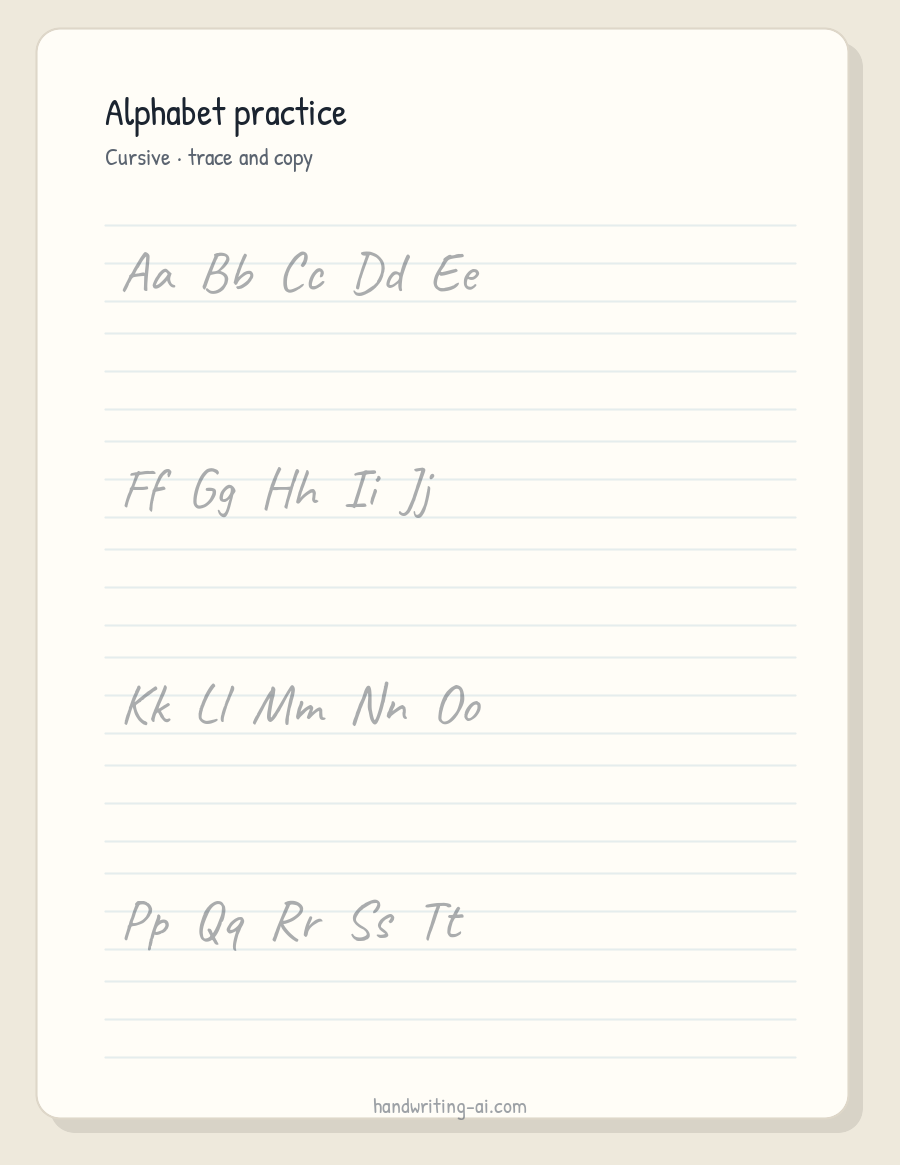

Digital worksheet examples from Practice mode
These pages are generated practice sheets, not photographs of printed paper. Use them to learn the workflow for alphabet, name, word, and sentence practice. Export PNG or PDF on Free or paid plans, then print at 100 percent.
Before you start
Open Practice mode, choose a clear cursive model, set content to alphabet, name, word, or sentence, use trace plus copy with three-line or four-line guides, pick Letter or A4, then export PNG or PDF using monthly download credits. Do not use Original Handwriting 01 here; it is a non-cursive font and is the wrong model for cursive joins.
Step 1
Choose the practice level
Start with alphabet sheets, then names and words, and move to short sentences only after basic forms and joins feel comfortable.
One level per page is easier to teach from than a mixed alphabet-and-sentence sheet.
Name practice is often more motivating than random words once letter forms are familiar.
Before moving on: The page has a single clear job: letters, names, words, or sentences.
Step 2
Open Practice mode and pick a cursive model
Use the cursive practice sheets tool. Choose a clear cursive model that matches what the learner is expected to reproduce.
Do not select Original Handwriting 01 for this workflow. It is a non-cursive print font meant for notes and cards in the main editor.
Keep the model steady. Practice sheets should not inherit the Position and Stroke variation used for finished notes.
Before moving on: The preview shows a cursive model with consistent letterforms across repeated rows.
Step 3
Select trace plus copy rows
Use tracing for the first attempts and a blank guided line immediately afterward for independent practice.
Trace only is useful for first contact with a new letter. Trace plus copy checks whether the learner can reproduce the form without an outline.
Copy-only rows work later as a quick review once the motion is familiar.
Before moving on: Each model row is followed by enough guided space for the learner's own attempt.
Step 4
Set three-line or four-line guides
Choose the ruling system already used by the learner's school or handwriting program.
Three-line and four-line guides both show letter zones. Consistency with classroom materials matters more than switching systems for novelty.
Baseline-only sheets are better for later review than for absolute beginners.
Before moving on: The guide height matches the program the learner already knows.
Step 5
Export PNG or PDF and print at actual size
Download the current page as PNG or export all pages as PDF on any plan. Disable printer scaling so the guide height remains consistent.
Printed desk photographs for these worksheets are still pending. Trust a ruler check on your own printout more than an on-screen zoom level.
Verify one sheet at 100 percent before printing a classroom batch.
Use the footer controls to customize the footer text or hide it before exporting.
Before moving on: A printed test page shows the intended line height, and the model is large enough to trace comfortably.
Reproduce this example
Copy the full sample text below. Keep blank lines when pasting into the editor. The settings document the exact page shown above.
Aa Bb Cc Dd
Olivia
Practice makes progress.
- Mode
Practice
Creates repeated models and guide lines instead of a finished handwritten note.
- Font / model
Readable cursive practice model (not Original Handwriting 01)
Practice sheets need a clear, repeatable cursive model. Original Handwriting 01 is a print-style font and should stay in the main editor, not in cursive Practice mode.
- Content
Alphabet, name, word, or sentence
Lets the worksheet match the learner's current task without mixing levels on one crowded page.
- Guide
Trace + copy
Combines a visible model with an independent writing attempt on the next guided line.
- Lines
Three-line or four-line
Shows baseline, x-height, ascenders, and descenders according to the program the learner already uses.
- Page size
Letter or A4
Uses standard classroom and home printer sizes.
- Export / DPI
PNG or PDF on every plan
Practice worksheets use monthly download credits on every plan, and both PNG and PDF are available on Free. Print at 100 percent so guide height stays consistent.
- Output pixels
Example sheet renders · 900 × 1165
The evidence images are digital worksheet renders at the Letter-style preview size. Final PNG or PDF pixel density depends on the export path and plan.
Plan a cursive worksheet before opening Practice mode
Alphabet sheets teach individual forms, but word and sentence practice is where spacing and joins become useful. Keep each page focused on one level.
Use trace plus copy instead of tracing alone
Tracing introduces the motion. A blank guided line immediately after it checks whether the learner can reproduce the form without a visible outline.
Print worksheets at the intended scale
Printer fit-to-page settings can change line height. Export a standard Letter or A4 file and print at 100 percent when consistent guides matter.
Next step: weekly spelling packets
Once letter forms and joins feel stable, move from isolated cursive practice sheets to a weekly word list. Build look-cover-write-check pages, tests, and other spelling activities in the spelling worksheet generator, then keep the same guided lines learners already know.
Choose the practice structure
The right worksheet changes as the learner moves from recognizing letter shapes to writing words and sentences independently.
| Structure | Best for | What to check |
|---|---|---|
| Trace only | First contact with a new letter or join | The model should be large, clear, and repeated enough to follow. |
| Trace + copy | Building control before independent writing | Place a blank guided line immediately after the model. |
| Copy only | Reviewing whether the learner can reproduce the form | Leave enough vertical space for the learner's own letter height. |
| PNG vs PDF | One page versus a multi-page pack | Both use monthly credits; PDF preserves page order and paper size for printing. |
Useful templates
Name and sentence practice
Olivia
Olivia
Olivia

Practice makes progress.
Start with the learner's name or a short meaningful sentence, then repeat it across trace and copy rows rather than filling the page with unrelated words.
Fix common problems
Printing with automatic scaling
Fit-to-page can change the guide height and spacing. Print at 100 percent and confirm the line system with a ruler before making a classroom batch.
Using natural variation for the model
Finished notes benefit from variation, but a practice model should be repeatable. Keep the model clean and use separate blank lines for independent writing.
Using Original Handwriting 01 as a cursive model
Original Handwriting 01 is a print-style font for the main editor. Cursive practice needs a cursive model that shows joins consistently across repeated rows.
What this example covers
- The worksheet is a printable practice aid, not a handwriting assessment. Adapt the guide system to the learner's school or occupational-therapy program.
- Letter and A4 exports are easiest to reproduce. Test a single page before printing a full pack so line height and margins remain consistent.
- This guide's evidence images are digital worksheet renders. Printed desk photographs for practice sheets are not included yet.
Questions
Can I make cursive name tracing worksheets?
Yes. Enter one name or a list of names, choose a cursive model in Practice mode, and use trace plus copy lines.
Should beginners use three-line or four-line guides?
Both show letter zones. Choose the system already used by the learner's school or handwriting program.
Is trace plus copy better than tracing alone?
Trace plus copy introduces the motion and then checks whether the learner can reproduce the form without a visible outline.
What can I export on Free versus Pro?
Every plan can export practice pages as PNG, ZIP, or PDF using monthly download credits. Print PNG or PDF at 100 percent.
Can I use Original Handwriting 01 on practice sheets?
No for cursive Practice mode. Original Handwriting 01 is a non-cursive print font for notes and cards. Use a cursive practice model here.
Make the next practice sheet
Open Practice mode, choose alphabet, name, word, or sentence content, set trace plus copy with three-line or four-line guides, then export PNG or PDF.
Create cursive practice worksheets